


Key takeaways
Wix email marketing sticks out for its clarity. Its plans, native integration with the Wix ecosystem, and simple pricing turn it into a preferable option for small businesses and website owners.
Mailchimp offers more advanced email marketing capabilities with deeper automation, A/B testing, advanced segmentation, a larger template library, and 300+ integrations, making it a better fit for growing businesses with more complex marketing needs.
Choose Wix if you want an all-in-one website and email solution with lower costs. Opt for Mailchimp if you favor scalability, sophisticated marketing features, and a wider ecosystem of integrations.
Many people still believe that if you’re looking for an email marketing platform that’s affordable, ecommerce-friendly, and easy to use, Mailchimp is the way to go. But this is now more myth than reality.
In fact, an increasing number of small business owners are opting for Mailchimp alternatives, such as Omnisend or Wix’s email marketing tools.
Wix email marketing and Mailchimp both help you send email campaigns, but they solve different problems. Wix is built for people who want email to sit close to their website, while Mailchimp is built for people who want a deeper email marketing platform with more room to grow.
If you are comparing Wix email marketing vs. Mailchimp, the real question is not which tool has more features. It is rather this: which tool fits the way you work today, and which one will still fit after your list grows?
We’ll compare Wix and Mailchimp based on their pricing, features, integrations, deliverability, and customer service. But let’s go ahead and cover the basics first.
Wix email marketing vs. Mailchimp at a glance
Let’s quickly look at the comparison chart to get a basic sense of how Wix differs from Mailchimp.
| Dimension | Wix email marketing | Mailchimp | Winner |
|---|---|---|---|
| Pricing | Free plan: 200 emails/month Essentials plan: $10/month (paid yearly) – 500 emails/month Core plan: $24/month (paid yearly) – 5,000 emails/month – Emails from multiple addresses Advanced plan: $49/month (paid yearly) – 1,000,000 emails/month – Emails from multiple addresses |
Free plan: up to 250 contacts and 500 sends/month Essentials plan: $13/month – 5,000 emails/month – 3 seats Standard plan: $20/month – 6,000 emails/month – 5 seats Premium plan: $350/month ($297.50/month for the first year) – 150,000 emails/month – Unlimited seats |
Wix |
| Features | Good drag-and-drop editing Current templates Automations for abandoned carts Form submissions Purchase follow-ups Segments and stats No A/B testing |
Deeper editor options 100+ templates A/B testing Dynamic content Send-time optimization Multivariate testing Predictive segmentation Marketing automation flows |
Mailchimp |
| Integrations | Best inside the Wix ecosystem, with built-in marketing integrations and tracking tied to your Wix website and site data | 300+ integrations, plus a much bigger app directory and broader third-party reach | Mailchimp |
| Deliverability | Wix gives you deliverability stats, best practices, and sender reputation guidance, but the product is lighter on deliverability tooling | Mailchimp is more explicit about deliverability, publishes deliverability guidance, and says it helps messages reach inboxes with 99%+ deliverability | Mailchimp |
| Customer support | Wix says 24/7 customer care is available on its plans, with live chat and callback support, plus a large help center | Mailchimp gives free-plan email support for the first 30 days, 24/7 email and chat on paid plans, and phone support on Premium | Wix |
Why do people choose Wix email marketing and Mailchimp?
Wix email marketing becomes the first choice for people who already run their business on the Wix website builder and want to keep all apps in one place.
That setup makes sense for simple email marketing campaigns, quick promotions, and site-connected automations without having to jump between tools.
People choose Mailchimp when they want a more mature email marketing platform with stronger automation for sophisticated email campaigns, broader integrations, and better control over segmentation and reporting. It is the classic “grow into it” choice for teams that expect their email marketing platform to carry more of the workload later.
Wix email marketing vs. Mailchimp: Pricing
The main difference between these two platforms is that Wix email marketing plans charge a flat rate, while Mailchimp’s pricing is contact-based, so it gets more expensive as your subscriber list grows.
If you’re not willing to commit to a paid plan yet, both Wix and Mailchimp have free plans with limited access to the most basic features you’ll need to create your first automated email campaigns.
Wix email marketing pricing plans
Wix email marketing pricing is still one of the biggest reasons people stay inside Wix.
- Free plan gives you 200 emails/month, and paid plans are now separate from Wix site plans, so your website builder bill and your email marketing bill are two different things.
- Essentials plan, according to the coverage of Wix’s logged-in pricing page in the middle of 2026, currently starts at $10/month (~$12 true monthly) when paid annually.
- Core plan starts at $24/month (if paid annually) and is recommended by Wix as a good place to start, since it covers all the basics with a little extra.
- Advanced plan, which offers most features for email marketing campaigns, can be grabbed for $49/month when paid annually. However, as with any other plan, you can choose to pay for two years upfront and get an even lower price, or pay monthly for a year at a slightly higher cost.
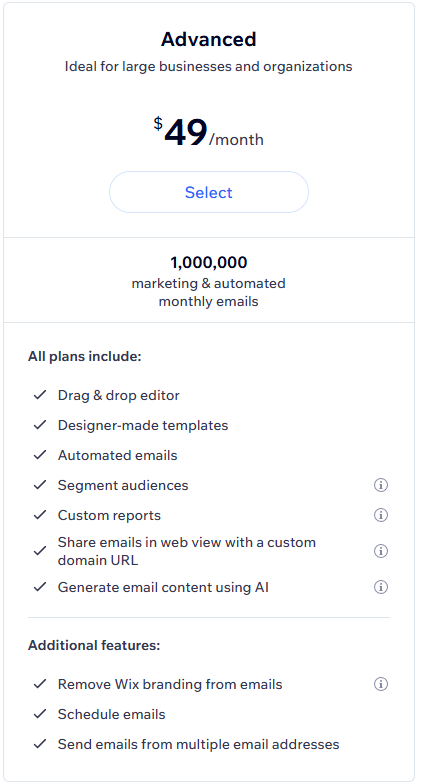
Wix’s paid plans that use a monthly email balance model also include scheduling, Wix-branding removal, multi-sender support, and custom URLs.
That framework works best when your sending needs are tied to the size of your site, not to a deep lifecycle program. You can send unlimited email marketing campaigns within your monthly allowance, but once you hit your limit, new sends stop until the balance resets or you upgrade.
Another great benefit of Wix is that a 14-day money-back guarantee is available on all plans.
Check our Wix email pricing guide for more details.
Mailchimp pricing plans
Mailchimp email marketing platform pricing is based on the number of contacts, so your bill increases as your list grows.
1. Free plan currently covers up to 250 contacts and 500 sends/month.
2. Essentials plan (starts at $13/month)
It has everything that you can find in the free plan, plus:
- Email and landing page templates
- Paid SMS add-on
- Customer journey builder
- Custom branding
- A/B testing
- 24/7 email and chat support
3. Standard plan (can be bought for $20/month)
Everything in the Essentials plan plus:
- Customer journey builder and branching points
- Send time optimization
- Behavioral targeting
- Custom templates
- Generative AI
- Dynamic content
4. Premium plan (starts at $350/month or $297.50/month for first year)
Everything in the Standard plan plus:
- Advanced segmentation
- Multivariate testing
- Comparative reporting
- Unlimited seats and role-based access
- Phone and priority support
A contact-based pricing model is ideal for teams that need greater flexibility, but it may not offer good value if you send only a handful of campaigns each month. Since Mailchimp charges overages when you exceed contact or sending limits, your actual costs can rise beyond the advertised price.
One advantage of Mailchimp’s paid plans is the increasingly comprehensive support they provide. Essentials and Standard come with 24/7 email and chat support, while Premium includes phone and priority support, four onboarding sessions, and additional tools for sophisticated teams.
You can test the Standard and Essentials plans for free for up to two weeks, but the Premium plan has no trial.
If you’re ready to invest in Mailchimp, you may as well consider Omnisend — it’s just more expensive but offers more features for ecommerce platforms, such as SMS marketing. Check our detailed Omnisend vs. Mailchimp comparison for more information.
You can also use our email pricing calculator below to compare rates and features with Mailchimp quickly. Simply enter your desired number of contacts, select Mailchimp from the list, and see how Omnisend compares.
Quick email provider pricing comparison
Quickly and easily compare the top email marketing providers so you can find the best platform for your ecommerce store needs.
Compare
prices for:
You can compare Omnisend and 2 more providers at once.
- Omnisend
- Klaviyo
- Mailchimp
- Drip
- Moosend
- Active Campaign
- Get Response GetResponse
- MailerLite
You can compare Omnisend and 2 more providers at once.
Select at least one provider.
Free
Tier 1
Tier 2
Tier 3
Still not sure?
Try out the full version of this calculator
The verdict
Winner: Wix email marketing.
It’s more comfortable to take Wix if you’re making your decision based on price. The free tier is more suitable for a website-first customer; the monthly balance is easy to understand, and the plan jumps remain reasonable until you need high volume.
Mailchimp gives you more power, but the cost climbs faster, and the free plan is much tighter now.
Wix email marketing vs. Mailchimp: Features
Email editor
Both platforms adopt drag-and-drop editing, but they do not feel the same. Wix’s editor is built to match a website builder workflow, so you can move quickly if you already know how to work inside Wix.
Mailchimp’s editor is more easygoing, especially on paid plans, where custom-coded and pre-built email templates sit alongside more advanced design controls.
This difference matters when you care about both speed and control.
Wix keeps the process close to the site, while Mailchimp leaves you more room to shape the layout, the message, and the follow-up path.
Templates
Wix currently offers around two dozen email templates, whereas Mailchimp provides more than 130.
The difference becomes apparent when managing a variety of campaign types, as Mailchimp offers more flexibility without requiring you to build each design from scratch.
Automation
Wix automation has moved well beyond welcome emails.
Currently, Wix provides:
- Automated emails for form submissions
- Abandoned carts
- Coupons
- Purchase follow-ups
- Other trigger-based workflows
According to Wix, these automations can include email statistics and custom email types.
Still, Mailchimp has the deeper stack. Its marketing automation flows feature supports:
- Multiple triggers
- Branches
- Unique actions
Mailchimp officially notes that the old customer journey builder was rebranded to marketing automation flows in June 2025.
This gives you a more advanced email automation structure for email sequences, lifecycle messaging, and more. And yet, it still doesn’t beat Omnisend on this one.
Omnisend allows you to add in other channels such as SMS, Facebook Messenger, push notifications, and more. You can even use conditional splits to further tailor your workflow around your customers’ engagement, demographics, and shopping behavior.
A/B testing
Mailchimp wins here by a wide margin. Mailchimp includes A/B testing on its plans, and its pricing pages also show multivariate testing on higher tiers. Wix, by contrast, only allows one test site per website, so A/B testing is not available for email marketing campaigns.
Mailchimp offers a more effective solution for teams interested in testing subject lines, send times, creative elements, and calls to action instead of simply guessing what improves click-through rates. Wix performs well overall but is less competitive in testing.
Segmentation
Wix offers enough advanced segmentation to target relevant groups. Wix support says you can build segments from contact attributes and site activity, and the current pages show examples such as abandoned carts in the last 30 days, labels, and custom conditions.
Mailchimp goes further with advanced segmentation options. Its pricing and feature pages show predictive segmentation, advanced customer segmentation tools on higher plans, and built-in audience management that tracks campaign engagement, purchase behavior, app engagement, and site views.
The verdict
Winner: Mailchimp.
Wix has developed into a capable email marketing platform with automation and segmentation features. Still, Mailchimp’s email marketing platform features continue to outperform those of Mailchimp in templates, A/B testing, advanced segmentation, and email automation.
If your campaigns are expected to become more complex, Mailchimp is the safer investment.
Integrations
This is where the two email marketing tools split hard.
Wix email marketing
Wix works best when your email marketing campaigns live inside the Wix website, and the rest of your business already runs on Wix.
Its feature pages highlight:
- Built-in email marketing
- Analytics
- Business tools in a single workspace
Wix email marketing makes the stack feel clean and connected, providing a range of features, all integrated within Wix, for your business beyond just email marketing.
Mailchimp
Mailchimp has a much bigger ecosystem. Its pricing pages list 300+ integrations, and its app directory covers a much wider set of third-party tools.
It gives you more options if you use multiple ecommerce or social media platforms, payment or reporting tools beyond a single website builder.
The verdict
Winner: Mailchimp.
If your stack needs more room to integrate with various tools and platforms without tying yourself to one builder, Mailchimp is ahead. Wix’s email marketing features are fine when you want fewer moving parts, but Mailchimp is stronger when your email marketing platform needs to connect to more of your business.
Deliverability
Wix email marketing
Deliverability is not the flashy part of email marketing, but it is the part that determines whether your email campaigns reach inboxes or end up in spam.
Wix explains deliverability, sender reputation, and best practices in its help center, and it shows delivery, bounce, spam, open, and click data in the dashboard.
Mailchimp
Mailchimp provides more depth in this regard. It publishes dedicated deliverability resources, explains how sender reputation affects inbox placement, and claims a deliverability rate of 99% or higher.
It further builds deliverability into segmentation and audience management guidance, giving you more levers to improve results over time.
The verdict
Winner: Mailchimp.
Wix gives you the basics, but Mailchimp offers:
- More deliverability support
- Greater visibility
- More ways to shape campaigns around list quality
That matters when you are sending more than a few simple email campaigns each month.
Wix email marketing vs. Mailchimp: Customer support
Wix email marketing
Wix makes support readily available from the start. Its help center is extensive, the contact page includes chat access, and many support articles provide live assistance options for different account types. The company also states that 24/7 customer care is included in its plans.
That is useful if you do not want support to depend on how much you pay. For a small business owner trying to manage a website, a store, and email marketing campaigns at the same time, that kind of access saves time.
Mailchimp
Mailchimp’s support is stronger once you pay, but it is thinner on the free plan. The free plan includes email support for the first 30 days; Essentials and Standard include 24/7 email and chat support; and Premium adds phone and priority support.
It is a good system for teams that know they will upgrade, but it is less forgiving for those who need extensive guidance beforehand. Mailchimp’s onboarding experience also gets better on higher plans, yet its top support benefits remain exclusive to those tiers.
The verdict
Winner: Wix.
Although Mailchimp offers superior premium support, Wix extends support availability to more customers without making it an upgrade. From a customer-first standpoint, Wix delivers a stronger overall experience.
Neither of these providers’ customer support matches Omnisend’s, though. It is Omnisend’s strongest aspect, since average response times are roughly eight minutes. Other providers can often take hours or even days to respond, while you can connect instantly through Omnisend’s live chat.
Wrapping it up
Wix is the better fit if you already live in Wix, want a tighter setup, and care about a lower-friction price ladder. Mailchimp will suit you better if you need a more powerful email marketing platform with deeper testing, stronger integrations, better deliverability tooling, and more advanced automation.
So the overall winner is Mailchimp.
Wix wins on pricing and support, but Mailchimp wins in the areas that usually matter most once email commences driving real revenue: feature depth, integrations, email automation, segmentation, and deliverability.
If you need capabilities beyond what Wix email marketing and Mailchimp offer, Omnisend is worth considering.
In addition to email and SMS marketing, it includes predictive AI for segmentation and product recommendations, forms AI for improving signup forms, generative AI for campaign creation, and MCP integration that lets teams query store data directly through ChatGPT or Claude.
Omnisend’s paid-plan merchants averaged a $79 return per $1 spent in 2025, and it offers 24/7 support on all plans, including the Free plan.
Quick sign up | No credit card required
This article was researched and written by our experts following a precise process.
See the process
